
See the difference,
hear the truth.
Insert it after any effect or your whole chain, feed the dry/preFX into the sidechain, and DeltaMeter reveals — and lets you hear — exactly what changed. It's in open beta now: get in at 39 €, and every update — including 1.0 — is yours free.
Believe none of it. Look.
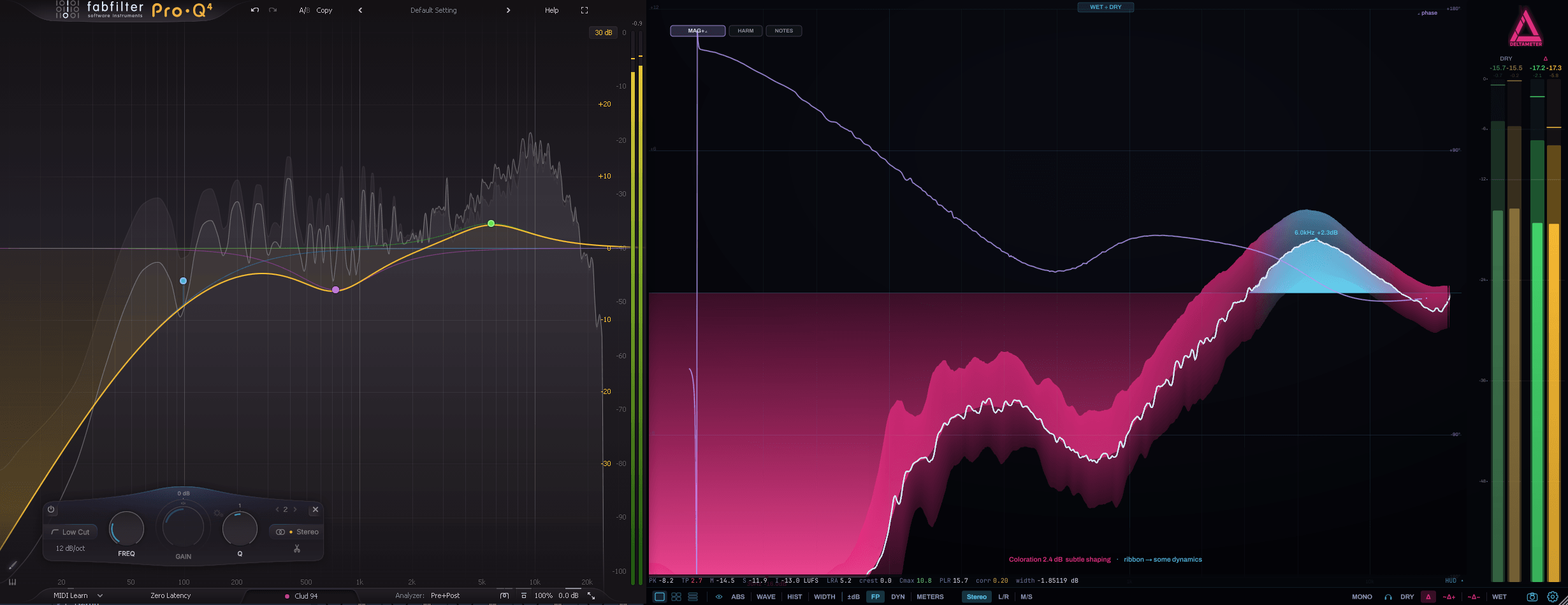
Your limiter says “transparent.” Your EQ says “0.5 dB.” Your saturator says “subtle.” The plugin on the left swears it’s gentle.
On the right, the exact delta shows what that move really did to your signal — phase and all. The gap between what you assume and what DeltaMeter shows you is the whole point.
See it. Hear it.
Pick a source to MONITOR 🎧 — what you hear. Pick a mode to VIEW 👁 — what you see. The analyzer follows the source automatically. One mental model, no hidden modes.
ABS · WAVE · HIST · WIDTH · METERS follow the source you monitor. ±dB, Footprint and DYN are transfer views — they always compare wet vs dry.
Every chain has a fingerprint.
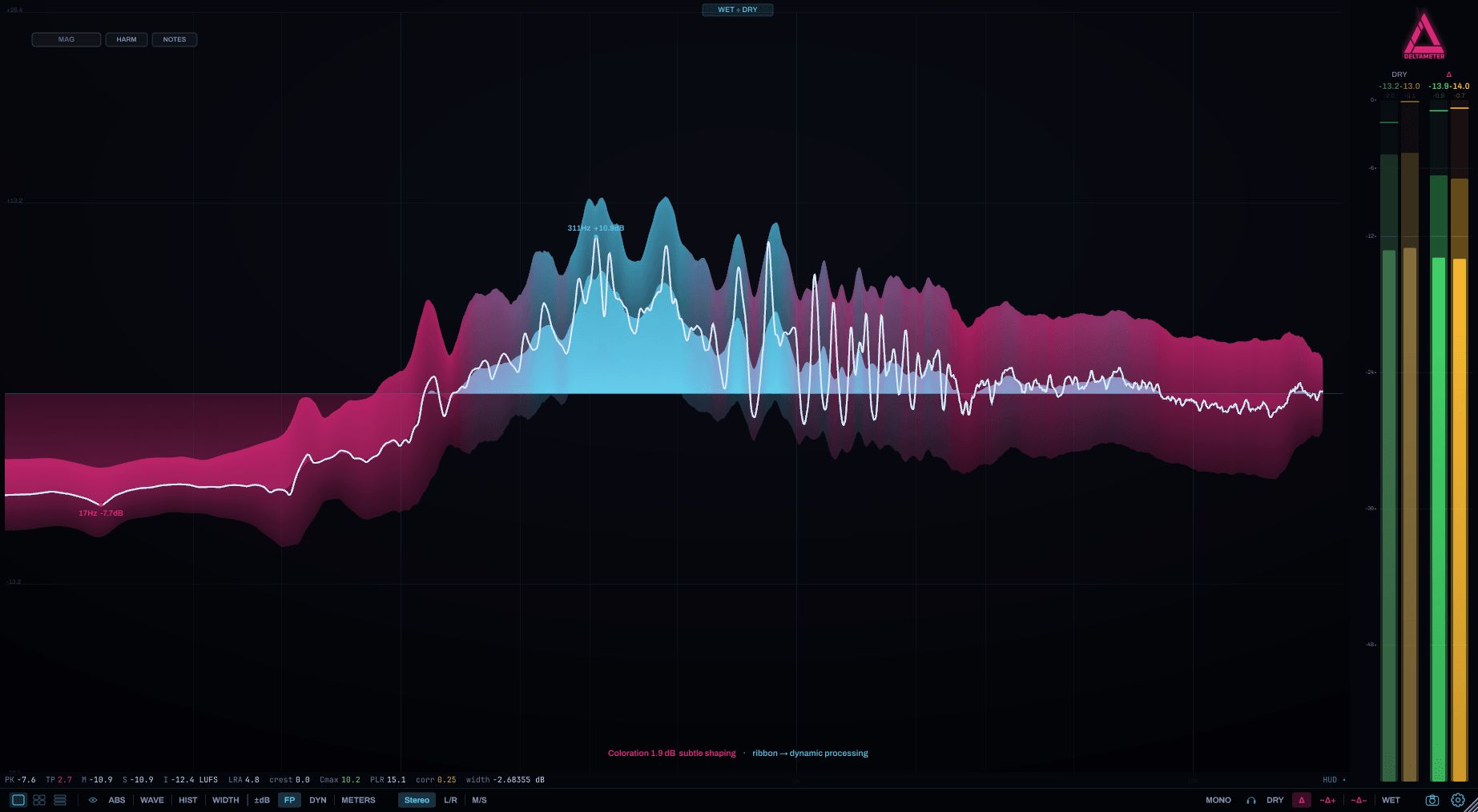
Footprint time-averages your whole chain into a single transfer curve — one glance reads the lot. Thin band = a static EQ; wide band = dynamic processing. (We call it TACO: Time-Averaged Chain Observation.)
On WET or DRY it becomes an absolute footprint with a drift ribbon showing how lively each band is, plus a dashed crest ceiling — the gap above the average is your crest factor, read straight off the dB axis.
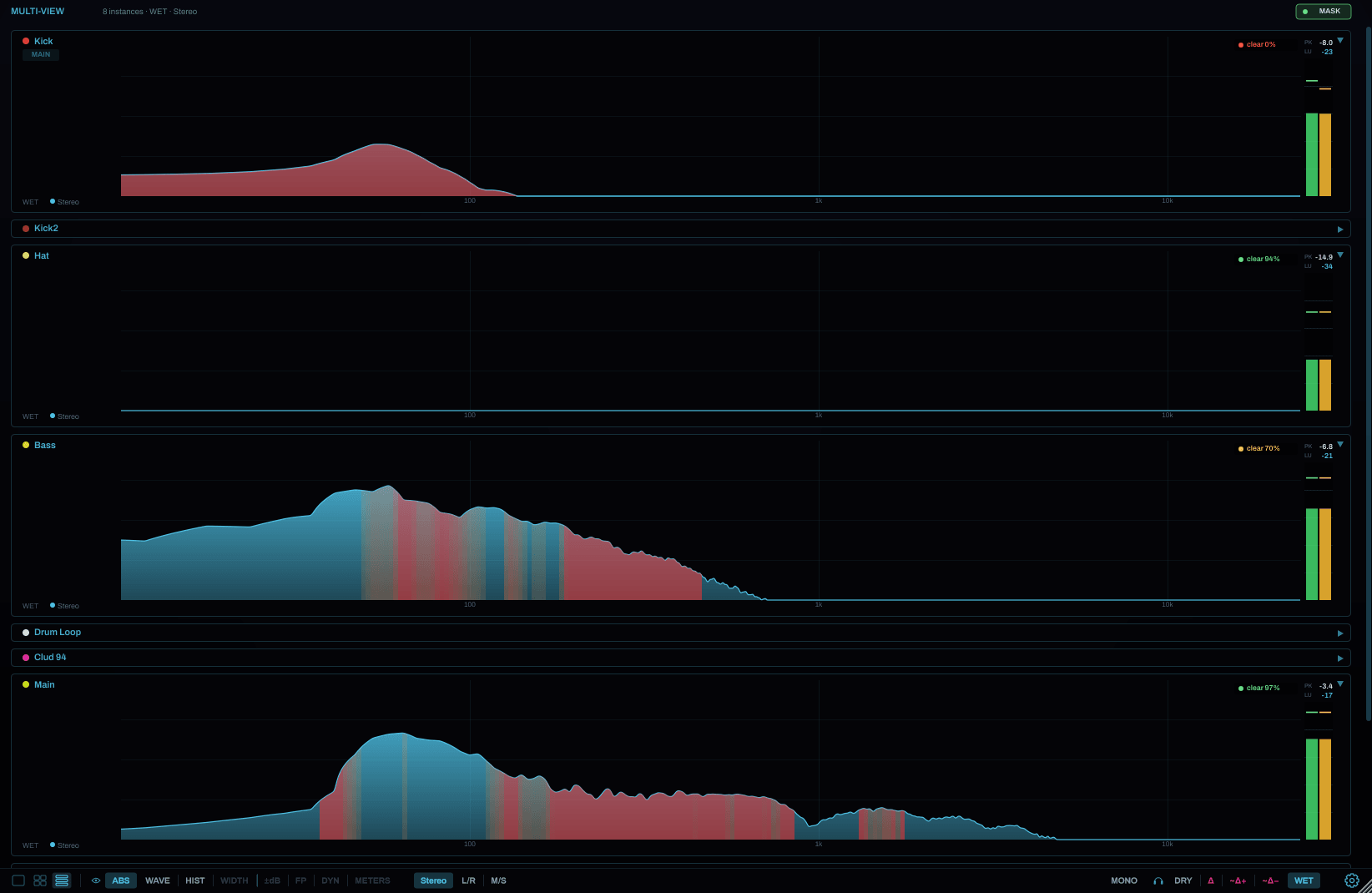
See your whole project at once.
Stop opening plugins one at a time. SWARM-View shows every DeltaMeter in your project, live, in one window. (We call it SWARM: Synchronized Wall of All Running Meters.)
No bussing, no routing — drop instances anywhere and they find each other. Rename and reorder the tiles, and let one leader reframe the whole wall. Switch on MASK and every tile lights up the bands where it’s being buried by the rest of the mix.
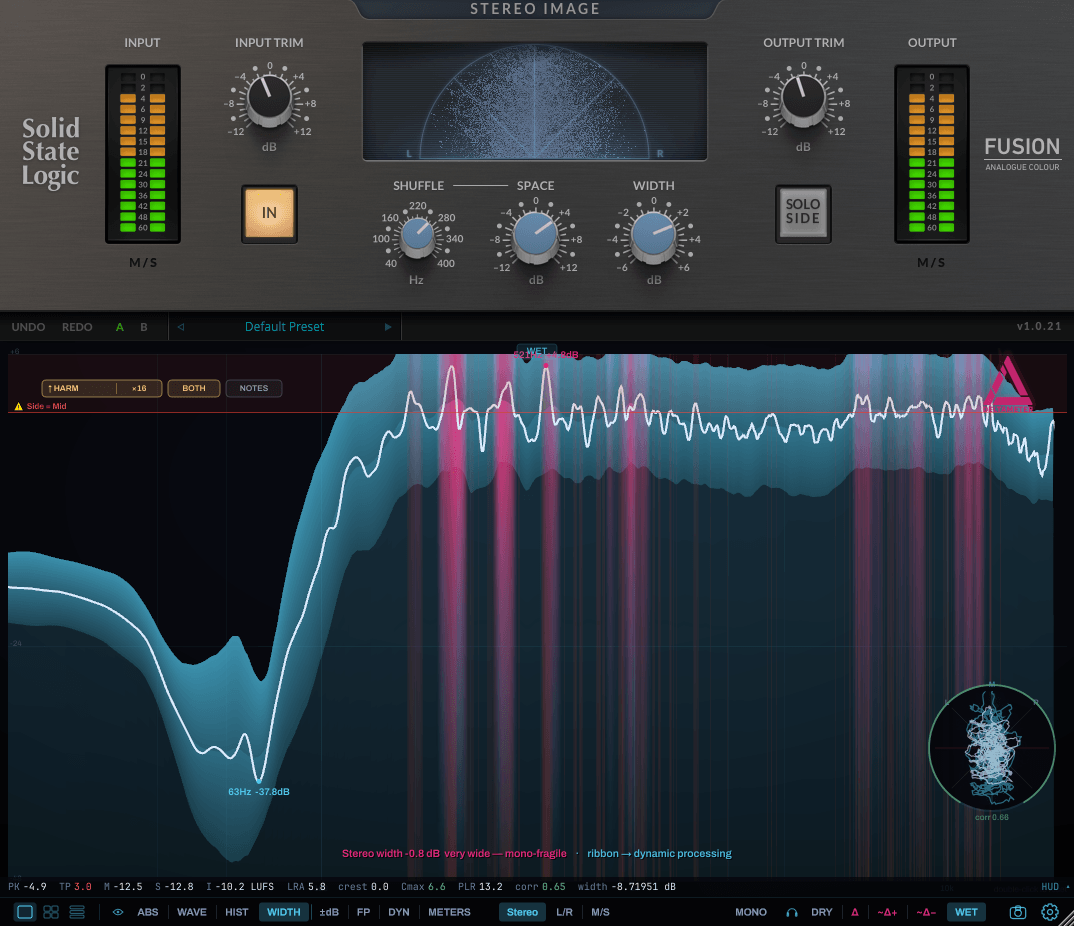
Your stereo field, per frequency.
WIDTH draws the stereo image band by band, with a goniometer and a correlation bar alongside.
It also flags the exact bands that vanish when summed to mono — before the club PA does it for you. Works as a standalone stereo analyzer too: drop it on a master, monitor WET.
Watch the compressor work.
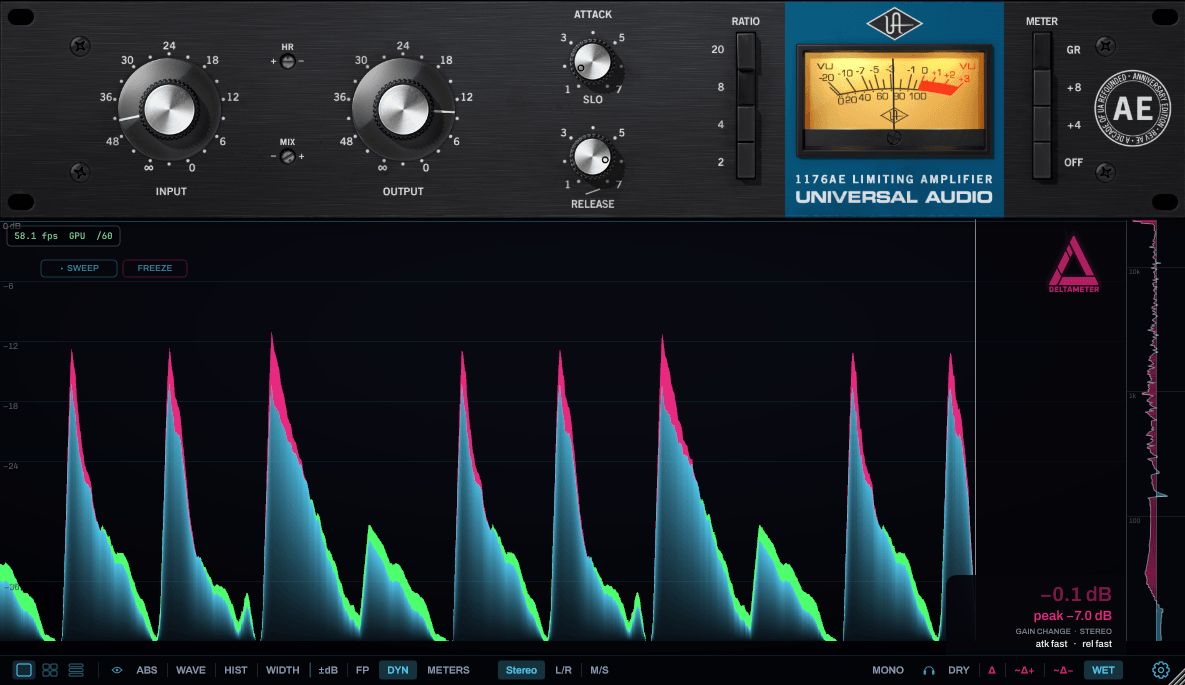
DYN draws gain reduction as a curtain over time, with a ±dB rail by frequency — so you see a compressor's real attack and release on your own material, not the numbers on the box.
Alt-drag the measurement ruler across the curtain to read the exact move — time, depth and slope in dB/ms. Hit FREEZE to hold the image still while you measure.
Your saturator, drawn by your own music.
SHAPE plots every sample as a point — dry in on x, wet out on y, forty-eight thousand measurements a second falling onto phosphor. The cloud that forms is your chain's real waveshaper curve, traced from your material — not the marketing diagram on the box.
Algorithms you've only ever heard become signatures you can tell apart at a glance: soft saturation draws a smooth S, a hard clipper flat corners, tape opens into a loop, a limiter fans into lines. And the view separates what no spectrum can: a plain waveshaper draws razor-thin to the curve, while a real transformer emulation wears a wide, soft veil around it — that halo is memory (phase, hysteresis), the part of "analog" you pay for and could never see. Four measured numbers put the character on a card: gain · bend · cloud · asym — how loud, how bent, how smeared, how warm. So when a plugin claims it's "just like the hardware", don't believe it. Look.

Freeze a moment. Scrub it. Hear it.
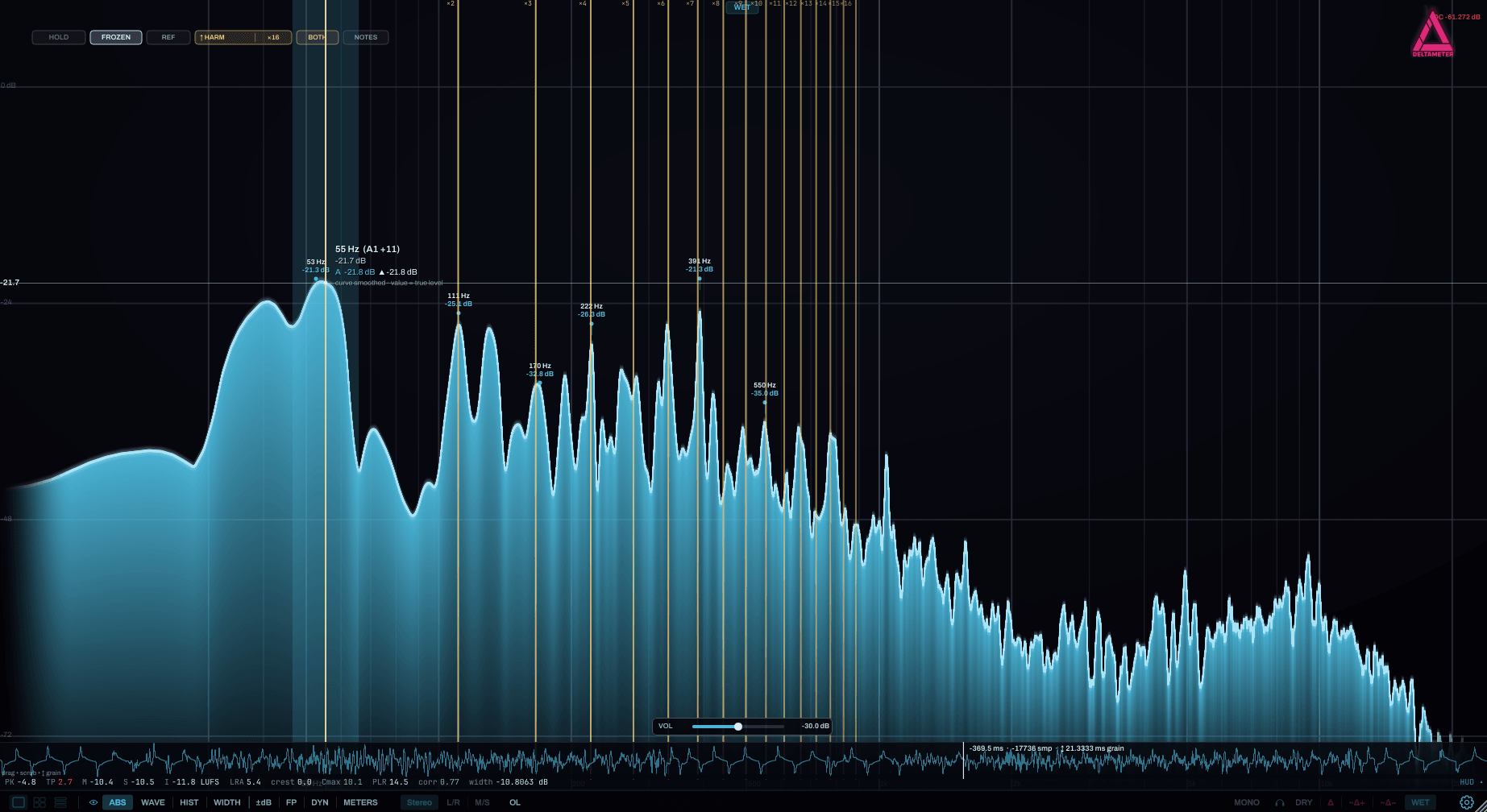
Hit FREEZE on the ABS spectrum to capture about a second of audio, then drag the timeline to scrub through it — sample by sample.
The spectrum redraws at the playhead and you hear the grain right under it — so you can hunt a click, a resonance or a transient and pin exactly where it lives.
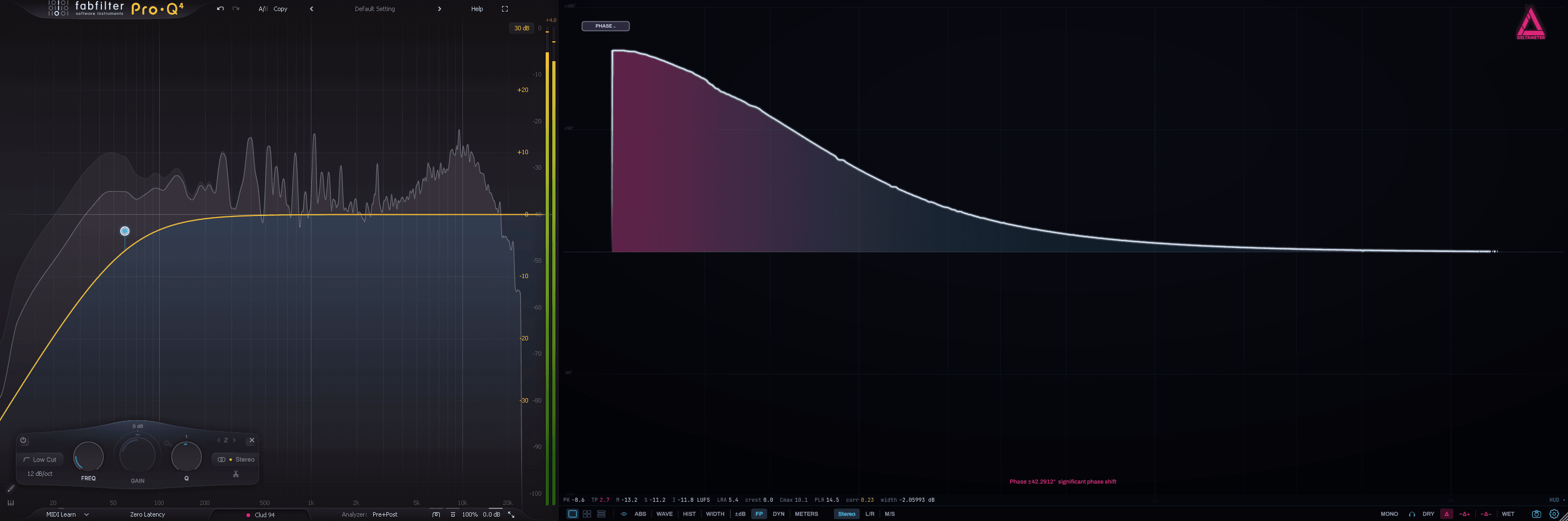
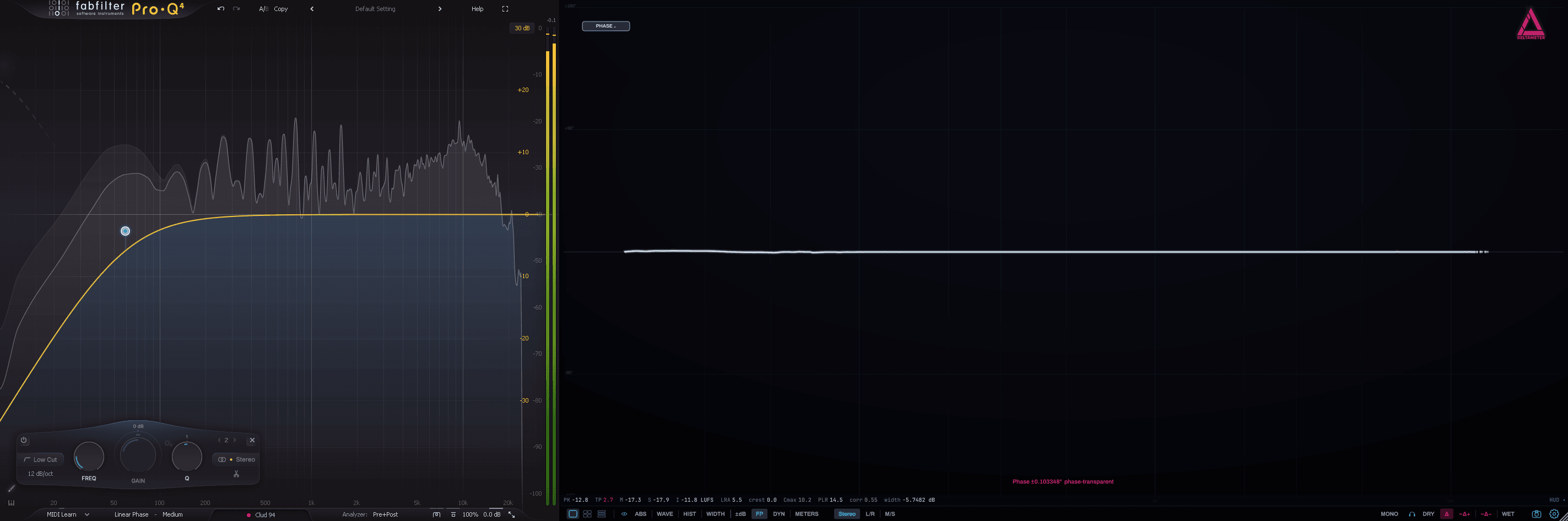
Two EQs, same curve, different delta.
In the Footprint transfer view, the MAG / PHASE / MAG+∠ pill reveals your chain’s phase response. Phase is why a linear-phase filter and a minimum-phase filter sound — and null — completely differently.
The same numbers, more context.
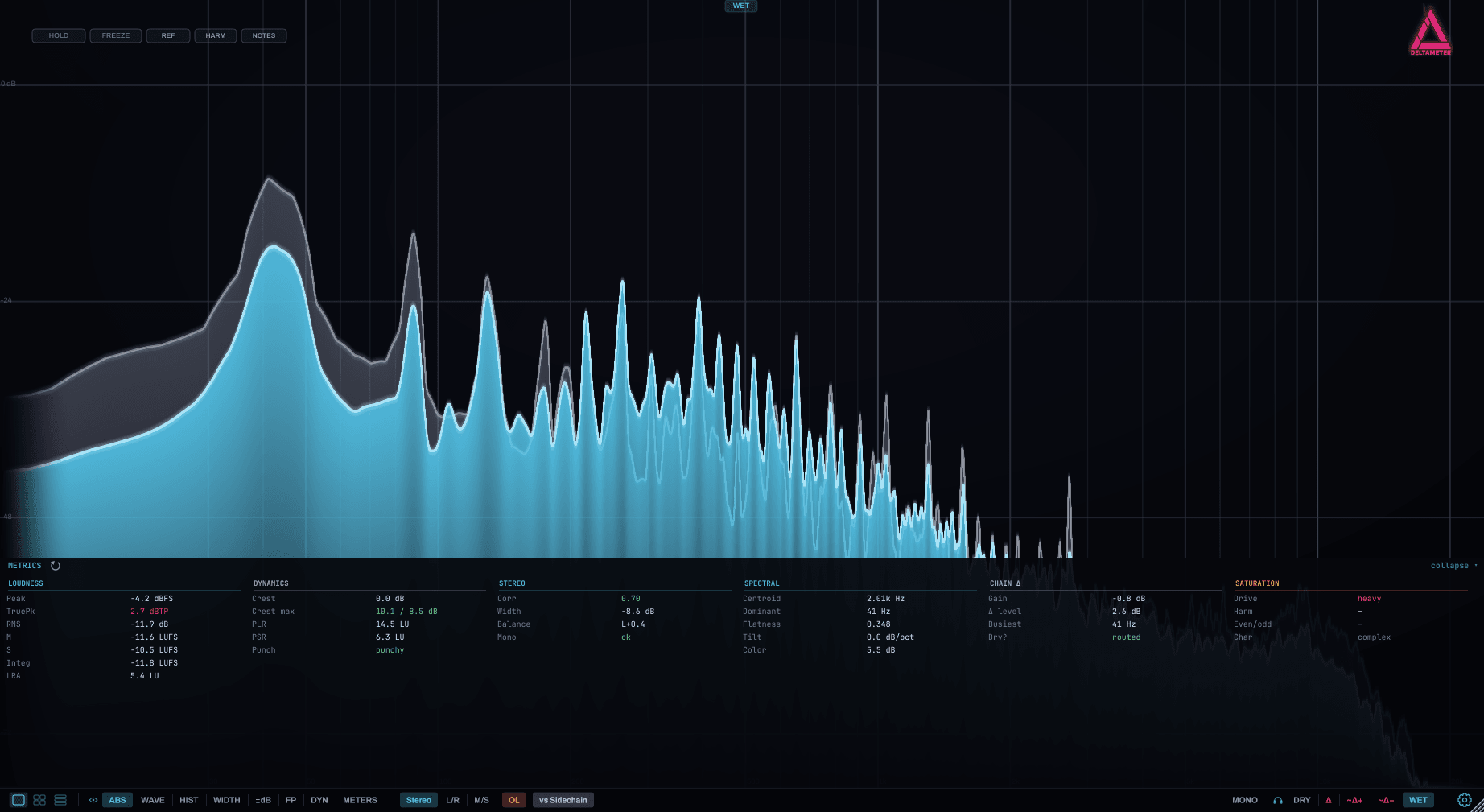
Full BS.1770 loudness — Momentary, Short-term, Integrated LUFS, LRA, True Peak — plus crest, PLR, PSR, correlation and spectral stats. One ticker, click to expand into a five-column dashboard.
We matched SPAN’s crest method on purpose: the loudness and crest values agree with the meter you already trust — and then show you ten things it can’t. Max-hold resets the moment playback starts, so every pass measures fresh, and a DC-offset flag warns you when the signal is carrying DC.
Not another spectrum analyzer.
A normal analyzer shows you the output and leaves you to guess what changed. DeltaMeter shows you the change itself.
Small tools, big payoff.
One license. Every format.
macOS (universal) & Windows. One license, all formats, all features.
Place DeltaMeter after your chain on the main path, and feed the dry signal into its sidechain. That dry reference is what the delta is measured against.
Specs & install.
DeltaMeter is light — the heavy spectrum drawing runs on your GPU, so it stays out of your CPU budget. Here's what it needs, and how to get past the OS warning on an unsigned beta build.
- OS Windows 10 (64-bit) · macOS 11 (universal)
- CPU Any 64-bit multi-core — Intel · AMD · Apple Silicon
- RAM 4 GB
- GPU OpenGL 3.2 — the spectrum is GPU-drawn
- Host Any VST3 · AU · CLAP host, or run Standalone
- Screen 1280 × 720
- OS Windows 11 · macOS 13 or newer
- CPU Recent multi-core — more instances, more headroom
- RAM 8 GB or more
- GPU Dedicated or recent integrated, drivers up to date
- Host Sidechain-capable DAW for the dry reference
- Screen 1920 × 1080 or higher
We're a brand-new studio just getting started, and code-signing certificates aren't cheap — so these beta builds aren't signed or notarized yet. Your OS will warn you the first time you install. Nothing is wrong: DeltaMeter is a pass-through metering insert and only analyses your audio. Signed, notarized 1.0 builds are on the roadmap.
If SmartScreen shows “Windows protected your PC,” click More info → Run anyway, then install as normal.
If Gatekeeper blocks the installer, right-click it → Open instead of double-clicking, then confirm Open — or allow it under System Settings → Privacy & Security.
Every DeltaMeter license includes DeltaWall.
A free standalone app that shows every Delta plugin in your project on one wall — one live tile each, no routing or setup — so you can watch the whole session from one window.
Get in at the beta price.
DeltaMeter is in active beta — stable, gorgeous, and shipping new builds often. Buy once now and every update, including 1.0, is free. The price climbs to 69 € at 1.0; beta buyers never pay again.
Before you commit.
Why a paid beta?
Honestly? Because it's already worth paying for — DeltaMeter is a real, usable tool I mix with every day — but making it perfect takes time. I'd rather charge a little and finish it properly than rush 1.0 or pad it out with upsells and ads. So the beta is priced low on purpose: 39 € now, 69 € at 1.0 — and if you buy in during the beta, every update, including 1.0, is free forever. You get a working tool today at the lowest price it'll ever have; I get the runway to get it right. Win–win.
Is it safe to run a beta on real sessions?
Yes. DeltaMeter is a metering insert — in normal use it passes your audio through untouched and only analyses it, so a beta build can't change or damage your sound. It's stable and in daily use here; if a build ever misbehaves, you simply keep the last one that worked for you.
Do I pay again at 1.0?
Never. Buy during the beta and every update — including the 1.0 release — is free, forever. The price rises to 69 € at 1.0 for new buyers; you keep the 39 € you paid and all the builds that follow.
Is there a free trial?
Yes — a full-featured 7-day trial is built in. Download it, run it in your own DAW on your own mixes, and buy a licence to keep it. Nothing is locked during the trial.
What formats and systems are supported?
VST3 · AU · CLAP · Standalone, on Windows and macOS (universal). One purchase covers every format, and each licence activates on two machines.
Why does my computer warn me when I install it?
Because the beta builds are not yet code-signed or notarized — we're a new studio and those certificates are pricey, so they're coming for 1.0. On Windows, click More info → Run anyway in SmartScreen. On macOS, right-click the installer → Open instead of double-clicking. DeltaMeter is a pass-through metering insert that only analyses your audio — see the full specs & install note above.
How do I set it up?
Insert DeltaMeter after the chain you want to inspect, and feed the dry signal into its sidechain — that's the reference the delta is measured against. It also runs as a standalone spectrum / stereo analyzer with no sidechain at all (just monitor WET).
Who's behind it?
One developer — me. DeltaMeter started as a Max for Live device I built because I couldn't find a tool that showed the exact difference my processing made. Your beta purchase funds the road to 1.0 and the tools after it.