Coming soon · from the makers of DeltaMeter

The EQ that sees
your whole mix.

Every other EQ shows you one track in solo. DeltaEQ’s bands see the context — the other tracks, the sidechain, the masking — and move only when the mix actually demands it. Surgical when you ask, automatic when you let it.
In final development · follow the news for the beta date
VST3 · AU & CLAP on the roadmap
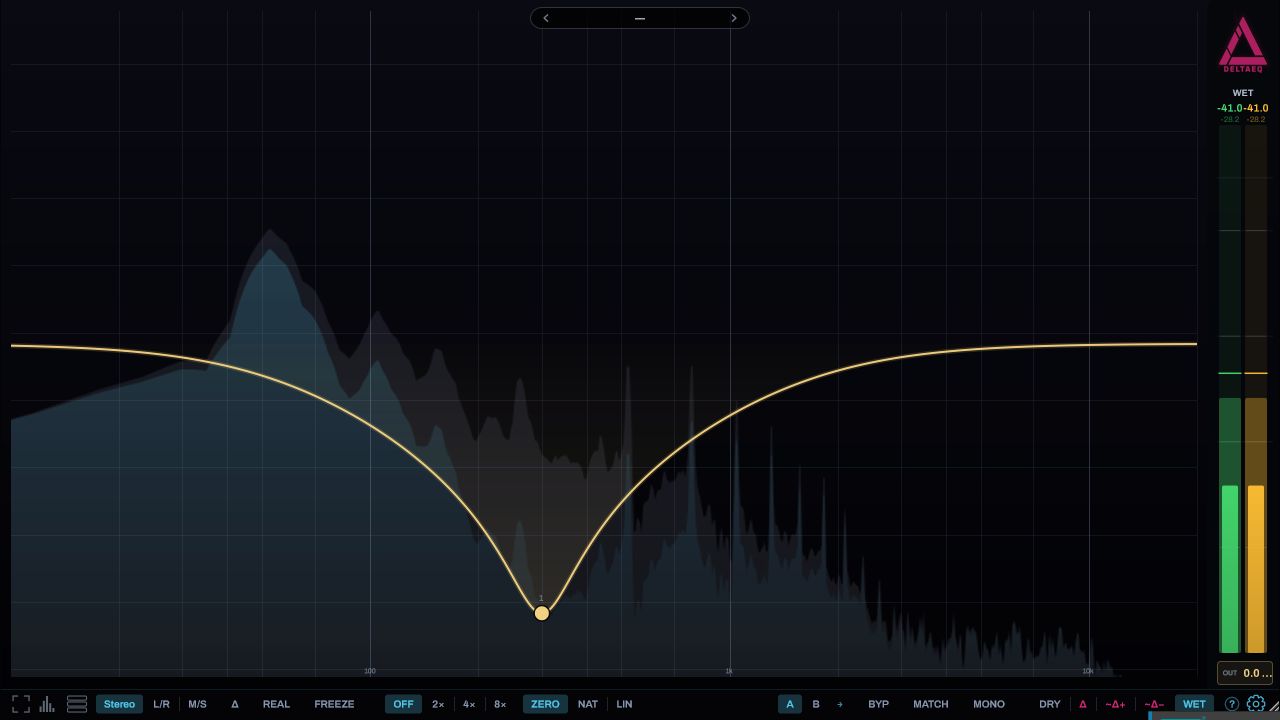
DeltaEQ — the analyzer canvas: a track's live spectrum with an EQ curve and the loudness rail
One track — with the whole mix in view
The problem

You EQ in solo. You listen in a mix.

Screenshot placeholder A band drawn over the context spectrum — the masking visible behind the curve
Your track’s spectrum — with the rest of the mix behind it

That vocal cut sounded perfect in solo. Then the guitars came back and the problem was never the vocal — it was the overlap.

DeltaEQ draws the other tracks behind yours, flags the bands where you’re being buried, and gives you bands that react to the mix itself. Stop guessing which track owns the frequency. Look.

Context ducking

An EQ move that happens only when it has to.

Put CTX on a band and it ducks only while another track — or the sidechain — actually needs that space. Kick hits, bass dips. Vocal enters, pad opens. Nothing plays, nothing moves.

With the @SC key the detection runs sample-accurately on the sidechain — the duck lands on the transient itself, not a spectral average later. Surgical & instant on the sidechain, contextual & smooth across tracks.

Screenshot placeholder A CTX band mid-duck — the live curve dipping while the key plays
The band ducks while the kick plays — and only while it plays
The Spectral band

Duck the frequencies, not the track.

The SPECTRAL band listens to the sidechain, finds its spike frequencies, and places a swarm of narrow bells exactly there — ducking precisely what masks, leaving everything else untouched.

The key curtain hangs the detected spectrum from the top of the plot — cause above, effect below, each curtain spike directly over the bell it triggers. Sidechain ducking you can read.

Screenshot placeholder Key curtain hanging from the top, live bells ducking beneath it
The curtain is the cause — the bells beneath are the exact cure
The bands

Every band is a specialist.

Channel-aware from the start: every band targets Stereo, L, R, Mid or Side — colour-coded the same way across the whole Delta family.

Bell · Shelf · Cut
The classics, with selectable cut slopes and a flat GAIN band for broadband trims.
Dynamic
Any band moves with the music — threshold, attack, release, drawn live on the curve.
Harmonic
One handle rakes a whole harmonic series — notch a resonance and its overtones in one move.
Spectral
A swarm of narrow bells that finds the sidechain’s spikes and ducks exactly those.
Harmonic filter

One handle. The whole overtone series.

A resonance never rings alone — its overtones ring with it. The Harmonic band rakes a series of bells across the harmonic ladder and moves them with one handle.

Pair it with Pitch-Track and the whole rake follows the note — a moving-target notch that stays in tune with the performance. Hover any band and the Harmonic Lens reads the note, the cents, and the live overtone ladder.

Screenshot placeholder Harmonic rake on a bass note — bells riding the overtone series
A rake of bells on the harmonic series — one handle moves them all
Better together

The Delta family finds each other.

Drop Delta plugins anywhere in your project and they connect — no bussing, no routing. DeltaEQ’s context comes from the other instances; DeltaMeter’s SWARM wall shows every DeltaEQ curve in the project.

And it’s not just display: grab a band from the wall and EQ any track without opening its window. Your whole mix, one view, every curve at your fingertips.

Screenshot placeholder DeltaMeter SWARM wall with DeltaEQ ghost curves, editable per tile
Every DeltaEQ in the project — visible and editable from one wall
And the rest

Small tools, big payoff.

Pitch-Track
A band that follows the note — lock it to a vocal or bass and the centre glides with the performance.
Harmonic Lens
Hover a band and read the note, the cents, and an energy-reactive overtone ladder.
Spectrum Freeze
Freeze the spectrum, scrub through it, and drop bands exactly on what you found.
Δ view
See exactly what the EQ changed — the difference, drawn, not imagined.
MATCH
Auto level-match wet to dry, so louder never masquerades as better.
A/B + copy
Two full states, one click apart — and a copy arrow when you commit.
Phase
Zero-latency, Natural, or Linear phase — your call per situation.
Oversampling
2× / 4× / 8× for clean curves right up to Nyquist.
60 fps · GPU-drawn
The spectrum and curves render on the GPU — fluid at any window size.
In one line

Context is the feature.

CTX
A band that ducks only while another track needs the space — an EQ move that happens only when it has to.
@SC
Sample-accurate sidechain key: the duck lands on the transient, not 100 ms after it.
MASK
See where the rest of the mix buries this track, band by band.
GHOST
Every DeltaEQ curve is visible — and editable — from DeltaMeter’s SWARM wall.
Included free

Every DeltaEQ license includes DeltaWall.

A free standalone app that shows every Delta plugin in your project on one wall — one live tile each, no routing or setup — so you can watch the whole session from one window.

See DeltaWall →
Status

Almost there.

DeltaEQ is in final development and in daily use on real mixes. The open beta — with the same buy-once, every-update-free deal as DeltaMeter — is coming soon.

DeltaEQ — Open Beta
Coming soon
Beta pricing and date will be announced on the news page. Meanwhile, DeltaMeter — the analyzer the whole family is built on — is in open beta today.